Should designers code work in production? Even before the Cambrian explosion of AI-enabled-design, design engineers introduced a new genre of hot takes: designers should either work directly from the production codebase, or ignore production and build and maintain a separate prototyping sandbox. Both sides are valid, but the internet does not abide nuance, so most teams I’ve worked with try to take either one approach or the other.
As an unusually-code-literate designer, I’ve always pushed my teams to treat code — frontend, backend, API and all the data in the database — as the source of truth. It used to take a herculean effort to walk this walk (including the full support of engineers who usually had more important things to do). But in a post-singularity industry, even we lowly designers can spin up dev boxes and tweak code in real time. With tools like Mainframe, Dessn, Figma’s new code layers, we can just pull that production code into the canvas and tweak in situ. Then, we ship, putting pull requests in without waiting for scoping, refinement, and the inevitable compromises that come from the prioritization queue.
At the same time, as an unusually-design-literate engineer, I’ve also asked engineers to see design as an opportunity to ignore technical constraints and technical debt. Years ago I used greenfield design to pitch a bespoke redesign of the website for WSJ. magazine, breaking out of the standard templates to get a high-end editorial feel. If I had colored inside the lines of the existing codebase, we would have been stuck with the same newspaper layout for stories about bespoke Italian tailoring from Japan.1
Unlike the internet, I love nuance. So why not both? Designers should work in the production codebase. Designers should maintain a prototyping sandbox. These are not two separate design environments. They are one thing: mirror mode. Think of taking a marker and drawing on a mirror, then looking through the glass. You can sketch new ideas, see how they look in the reflection, then erase as your vision becomes reality.
How it works
Instead of working directly from production, it’s possible to work from a copy of the production codebase. In git terms, this is a long-lasting branch that is never meant to merge directly into the main repo.
The branch — I like to call mine prototype — is regularly updated from production to make sure it’s always true to what users are seeing. Meanwhile, as work is completed, it is packaged up and submitted to the main branch as small, self-contained pull requests.
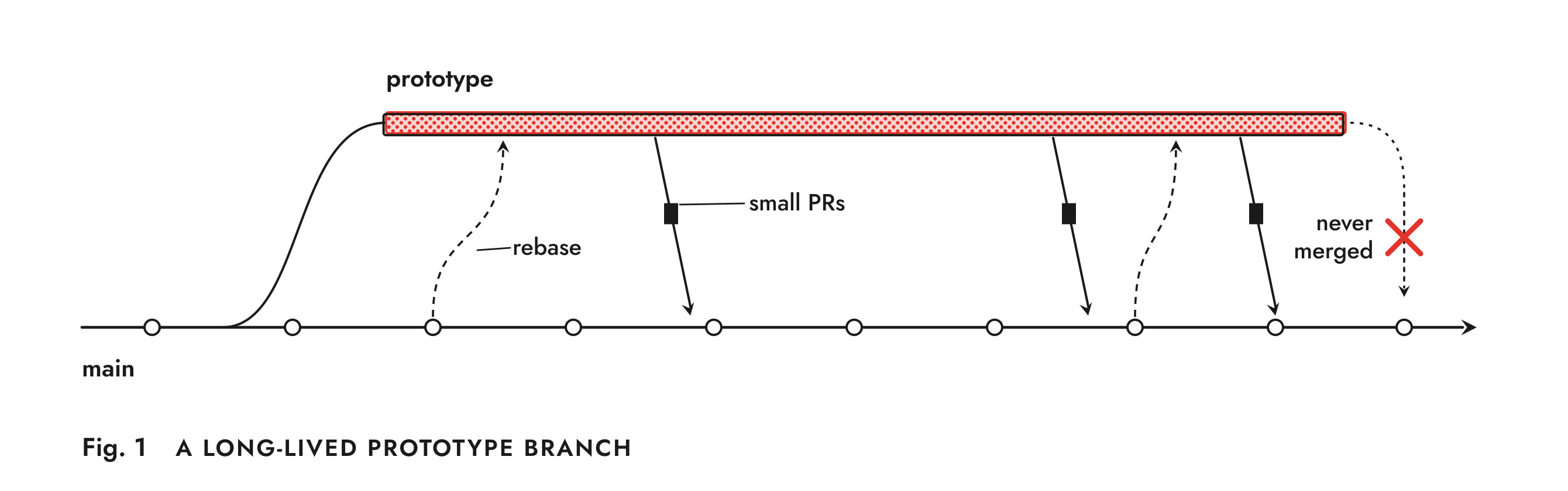
As I’m prototyping, there are often new ideas that depend on infrastructure work from engineering that isn’t built yet. For example, in a recent project, I wanted to show how AI could analyze all the user’s documents and flag contradictions. The actual production pipeline would be complicated and risky to build; we wanted to look at a mockup to nail down the experience, pitch it to the leadership team, secure the investment, then go build.
This is the place where a separate prototyping sandbox often comes in. But if you’ve built these, you know how disconnected they can feel, and how natural questions like ‘ok now what happens if i click back to the home page from here’ get stymied by ‘well this is just a prototype, we can’t do that’.
But with the production mirror, we can actually build what are called shims or mock APIs that simulate a production endpoint. These can make speculative features look like fully realized ones, sitting alongside or on top of real production data. That’s what we did with the document extraction feature, using a consumer AI to produce realistic data simulating what the in-house AI feature would look like once built.
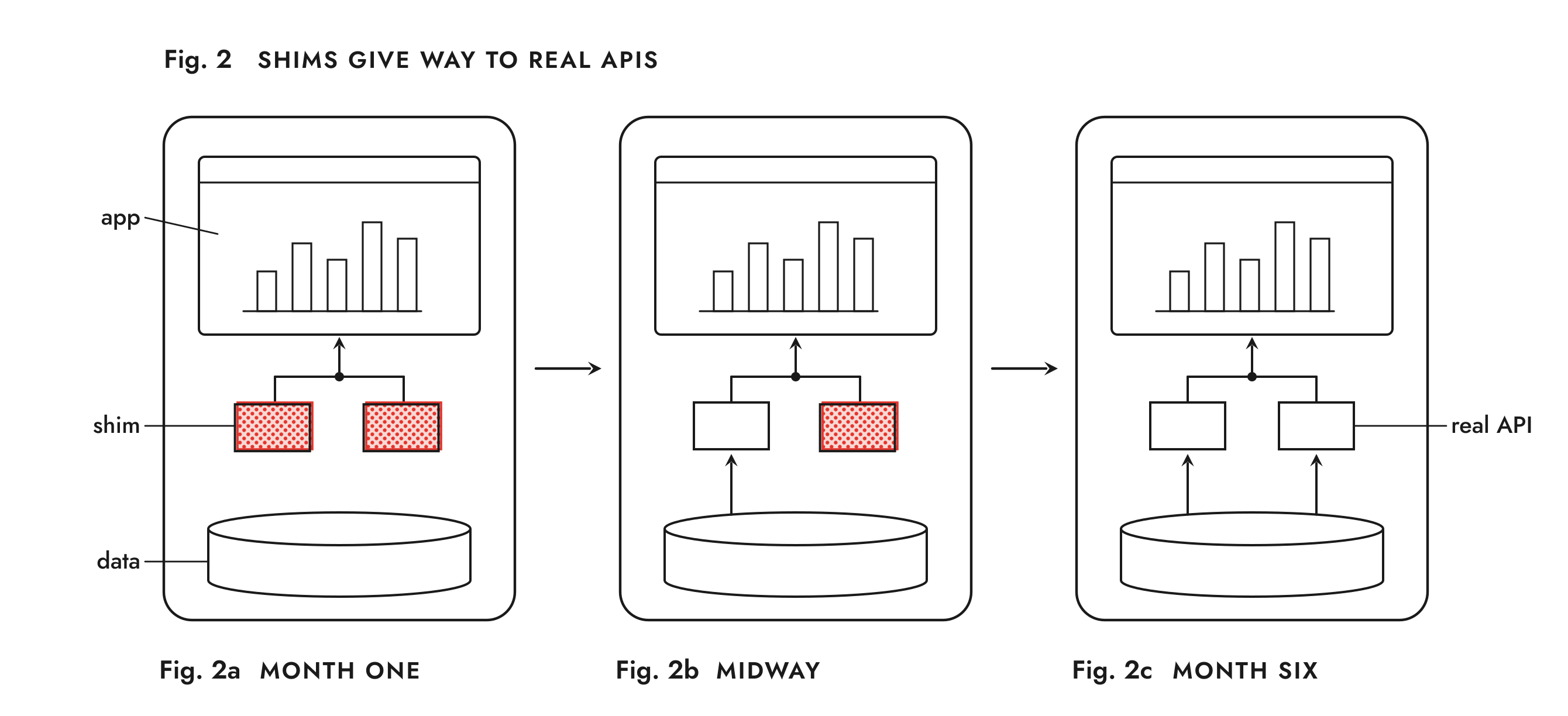
The brilliant part about mirror mode is that over time, as new features are supported and built, we get to remove the old shims in favor of the now-implemented features. The experience typically looks identical, but the prototype holds less overhead.
In a recent project, my prototype branch went from being 100% mock APIs to 100% real APIs over the course of 6 months as we built the product 0 → 1. Mocking data and interactivity puts designers at the architecture table in a way that helps engineers make more user-centric decisions; letting someone poke and prod at an experience to see how it breaks (or doesn’t) is way more effective than trying to anticipate every possible edge case.
In another project, I built and maintained an entirely separate, fully-interactive prototype mobile app, which is distributed to the team through TestFlight. It pushes code to and pulls code from the production app, but has dozens of demo toggles and knobs to put the app into all manners of error states and user scenarios. You can skip auth and onboarding to instantly see what a user would see on day 1 or day 100. You can delete your account to see the offboarding flow. And then you can reset it back to do it all again.
Pros
I’ve already extolled many of the virtues of mirror mode, but just to be explicit, here’s what’s great about it:
- Your work is ‘shovel-ready’; AI can quickly take the work in the prototype, break it into small chunks, polish and make it production-ready.
- No risk. Your prototype branch is for you and your collaborators only, so breaking it has almost no downside. You can try weird stuff and explore.
- Nobody cares about tech debt. Because the prototype doesn’t need to ship, it can run on the ugliest vibe code imaginable. In most teams I work with, the prototype branch needs no code review or expensive CI/CD runs.
- It runs under realistic conditions. Because most of the code is a direct copy of production, it’ll still have accurate timings and conditions; things that load slowly in prod load slowly in the prototype, too.
- Anyone — Josh from marketing, Sara from devops, even customers on research calls — can run it themselves. It’s a branch of the production repo, so if you work on production, you can easily spin up the prototype (or use preview environments) and check things out yourself.
Cons
If there were only upside, I imagine most teams would already be working this way. But there are some downsides to be cognizant of.
- It’s not a canvas. Designing beside production is largely prompting and tweaking the code. While design tools are largely trying to bring code to the canvas, this approach treats the canvas as a sidecar.
- You can easily forget it’s a prototype. I’ve had partners get lulled into a false sense of confidence because the prototype works well, not realizing that some of what they’re looking at is a mock API designed for a single use case.
- It’s not always clear what’s ready to build. Because it’s still something of a sandbox, exactly what’s done and what’s still WIP is hard to signpost. I’ve tried a variety of strategies here, but nothing is quite as concrete as a static export of a Figma artboard on a Linear ticket.
- It’s always open for feedback. This might not actually be a con on your team, but I’ve found that occasional drive-bys from the CEO can be disruptive, especially when context is needed to understand why something is the way it is.
- Drift. The prototype branch needs maintenance to ensure it’s up-to-date with production. If it falls behind, stakeholders notice and the illusion of working in production is broken.
- Security and access. Sometimes orgs are hesitant to increase access to production data, especially to folks who aren’t bound by some of the controls and restrictions that engineers are. I find this approach works best in smaller teams where designers are a de facto part of the engineering org.
Prompt in a box
If you’re interested in trying this out, here’s a prompt to try:
Set up a parallel branch to production called `prototype`. Schedule regular pulls and rebases so that it stays up to date.

The goal of this branch is to provide a design environment. Edit the agent instructions in the repo to guide the following workflows:

1. Exploring: mock APIs and data to enable seamless exploration of new features and concepts. Ensure the data and general shape of the API matches the existing work, down to its quirks and complications. Allow the designer to explore freely with shims and separation layers.
2. Implementing: pull orthogonal PRs off the diff to allow engineers to review and merge small, focused, well-documented chunks of work. Ensure each PR is free of dependencies and follows existing code and team etiquette.

NEVER merge this branch directly into main. ALWAYS rebase this branch from main, replaying work on top to keep it ahead of main's tip.
I hope it’s a useful approach for your team. Feel free to send me feedback and ideas for how to make it more useful to more teams.
Conclusion
Building on a production mirror isn’t for everyone. It eschews the canvas for prompting; it relies on AI to fill in separation layers and mock APIs; it requires maintenance to avoid becoming brittle and burdensome.
But if you’re of the right mind, building this way gets you the best of two modern approaches: you’re working with real data and real code, so your solutions to design problems are likely to land with real purchase. You’re also able to explore unconstrained by technical limitations, seeing where bold directions and new features take the product.
Like all design processes, there are pros and cons. But for my money, mirror mode is the fastest way to have a real impact on the quality and direction of software products.
Join the mailing list
I'll send new posts to your inbox, along with links to related content and a song recommendation or two.
Unfortunately the design has since been lost to time and the site is back to its standardized newspaper templates. RIP. ↩︎